Contents
Readme
If you have any issues then please let us know.
Installation on MacOS
Moonbass installer is signed and notarized by Apple to certify it safe, and so should install without problems. It will install both Audio Unit (AU) as well as VST3 versions by default. In addition presets will be installed.
AU plugins are installed in /Library/Audio/Plug-Ins/Components/
VST3 plugins are installed in /Library/Audio/Plug-Ins/VST3/
Installation on Windows
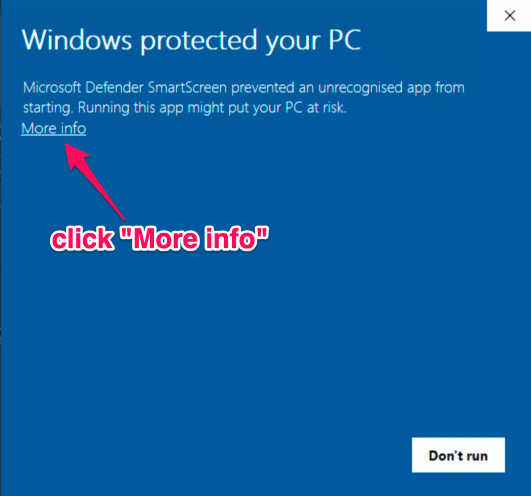
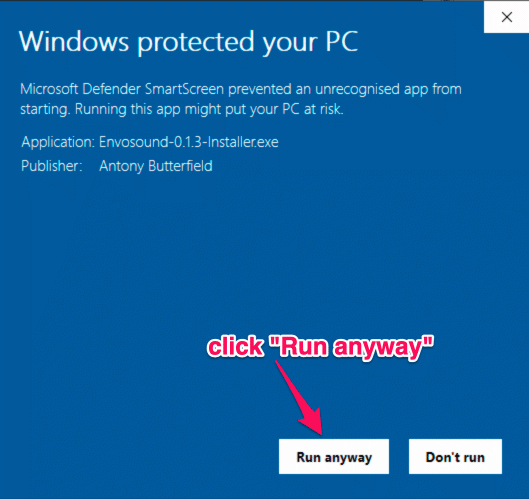
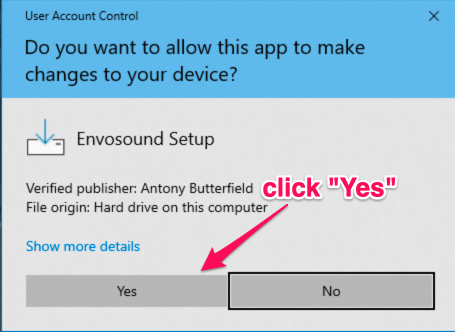
Windows installer is code signed with an IV certificate for Antony Butterfield. It may still cause a Windows SmartScreen popup due to this software being new - it takes a while for Microsoft to recognise and trust new vendors. This does not mean it is not safe. Please install with confidence. The following screenshots show what you should expect.
VST3 plugins are installed in C:\ Program Files\Common Files\VST3\
Change History
1.0.1 - 5 October 2026
- Fix MacOS binary to be universal (Apple Silicon and Intel)
1.0.0 - 3 May 2026
- New high resolution bass spectrogram
- Updated tempo control for accurate manual override of host tempo
- Reduced CPU overhead rendering traces
- Gain stage controls for matching input and sidechain levels
- Time offset control for tweaking scope synchronization on hosts that don’t properly perform latency compensation
- New themes to set different colours for scope traces and visualizations
0.3.3 - 5 January 2026
- Fixed installer package id on macOS to stop installation conflicts with Glaid
0.3.2 - 4 June 2025
- Menu option to toggle background from scope - thanks Mason (xrayjay) for suggestion
- Fixed excessive CPU usage on Timer that that could cause UI to lag - thanks to A55imilat0r for reporting
- Added CPU usage stats into log
- Improvements and corrections to manual - thanks to Brian Garlick for suggestions
0.3.0 - 6 May 2025
- Fix to update available checker to recheck reliably
0.2.0 - 30 March 2025
- Added feedback dialog
- Added available checker
- Added menu link to user manual
0.1.0 - 19 March 2025
- First public release