Contents
Readme
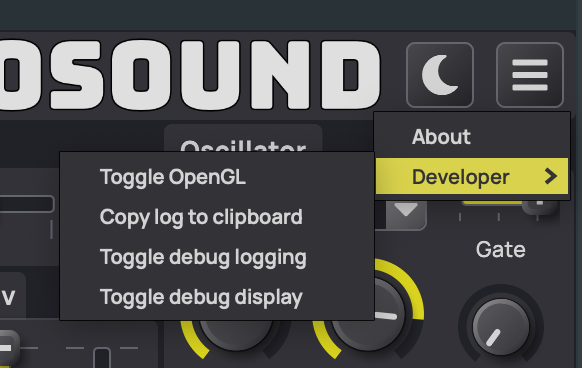
Envosound requires OpenGL v3.2 or greater. If openGL isn’t working correctly or is causing problems it can be disabled manually by clicking Menu>Developer>Toggle OpenGL
If you have any issues then please let us know.
Installation on MacOS
Envosound installer is signed and notarized by Apple to certify it safe, and so should install without problems. It will install both Audio Unit (AU) as well as VST3 versions by default. In addition presets will be installed.
AU plugins are installed in /Library/Audio/Plug-Ins/Components/
VST3 plugins are installed in /Library/Audio/Plug-Ins/VST3/
Presets are installed in /Library/Application Support/Tsuga/Envosound/ and user presets in /Users/[username]/Library/Application Support/Tsuga/Envosound/.
Installation on Windows
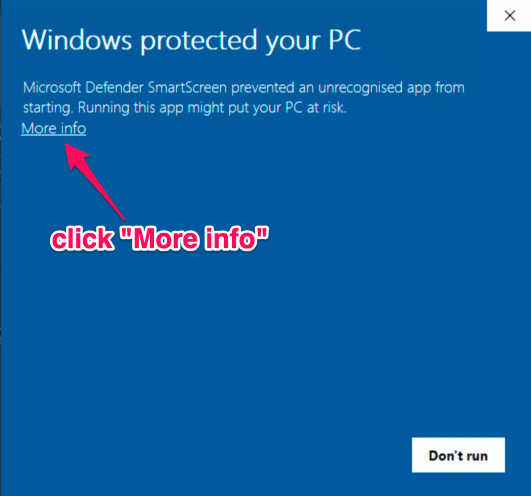
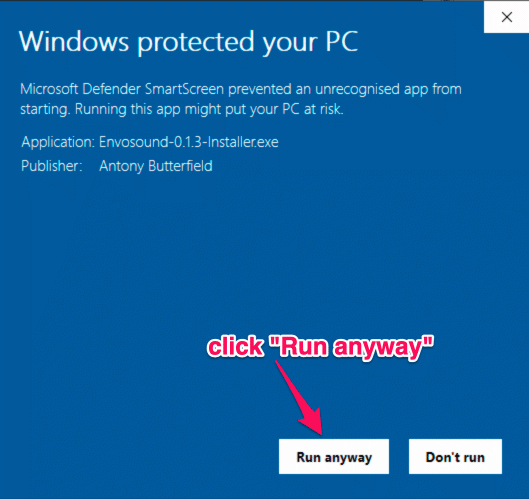
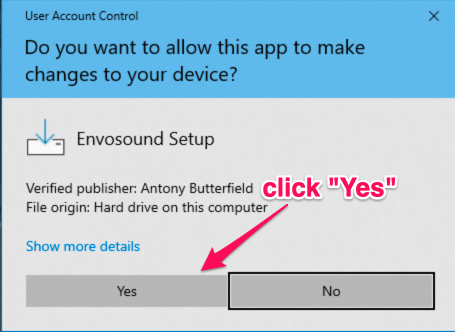
Windows installer is code signed with an IV certificate for Antony Butterfield. It may still cause a Windows SmartScreen popup due to this software being new - it takes a while for Microsoft to recognise and trust new vendors. This does not mean it is not safe. Please install with confidence. The following screenshots show what you should expect.
VST3 plugins are installed in C:\ Program Files\Common Files\VST3\
Presets are installed in C:\ProgramData\Tsuga\Envosound\ and user presets in C:\Users\[username]\AppData\Roaming\Tsuga\Envosound\
Change History
0.4.3 - 8 March 2026
- Fix playback getting stuck when audio buffer is large - particularly during offline rendering
0.4.2 - 5 January 2026
- Fixed glitches in playback when moving playback position and rendering offline
0.4.1 - 29 December 2025
- Fix to flow visualizer in DAWs with dynamic buffer size
- Fix installer to replace old presets with new
0.4.0 - 28 December 2025
- Flow visualizer now shows true frequencies rather than played notes
- Updates available button pulses and version info help tip
- Disable note offset sliders in relatavistic sequencer when count is zero
- More contrast in dark UI theme
- New presets
0.3.0 - 12 May 2025
- Fixed plugin update available checking logic
- Consistent sizing and layout of licensing and feedack dialogs
- Internal library updates
0.2.0 - 29 March 2024
- Sharpened up amplitude and filter attack curves
- Added product feedback submission dialog, accessed from button on toolbar
- Added software update available icon on toolbar (click to go to downloads page)
- Added licence info dialog
- Logging is now asynchronous and not on audio processing thread to avoid glitches
0.1.9 - 20 August 2023
- Highlight envelope position
- Smooth filter and effect changes
- Level meter
v0.1.7 - 17 February 2023
- Fix Daw compatibility causing notes to play
- Fix logarithmic vertical slider rendering
- Randomizer not slides between 1-10
v0.1.6 - 8 February 2023
- New simplified UI
- Microtonal scales
- Reverb and Delay effects
- Preset randomizer
- Help mode and help text built into UI
v0.1.3 - 28 November 2022
- First release for windows
- Fixed DAW clock synchronization issues
- Elimated dangling notes when clock changes
0.1.2 - 1 October 2022
- First public release